Fertilizer Calculator (NPK)
Type the nutrient rate you need and pick the product to get pounds (or kg) of fertilizer per acre, bags and cost.
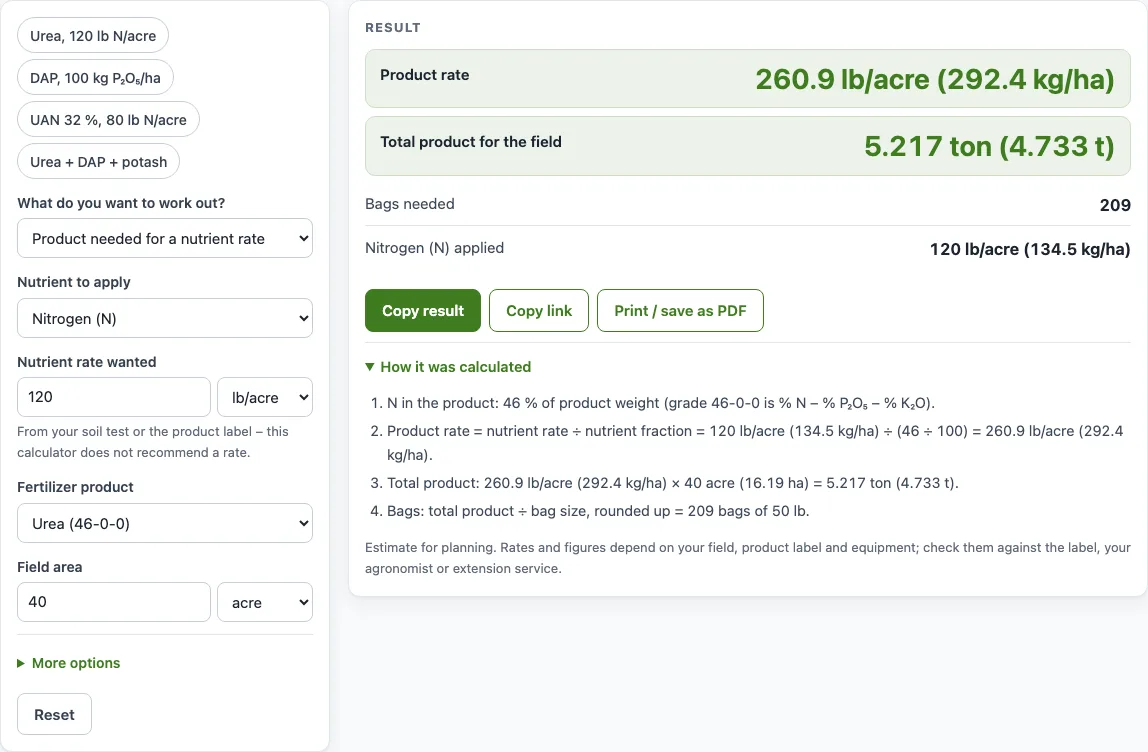
How to use the Fertilizer calculator
- In “What do you want to work out?”, choose product needed for a nutrient rate, nutrients from a product rate, or a blend of up to 3 products.
- In “Nutrient to apply”, pick Nitrogen (N), Phosphate (P₂O₅) or Potash (K₂O). This field appears only in the first mode.
- Enter the “Nutrient rate wanted” in lb/acre or kg/ha, taken from your soil test or product label.
- Choose a “Fertilizer product”. If yours is not listed, select “Other (type the grade)” and enter the “Grade (N-P-K)” as printed on the bag, such as 10-10-10.
- In the other two modes, enter the “Product rate” in lb/acre, kg/ha, gal/acre or L/ha. Gallons and liters work only for liquids.
- Enter the “Field area” in acre, ha, ft² or m².
- For a blend, set “Product 2” and “Product 3” and their rates. Leave a product as “None” if you do not need it.
- Read the results. If a warning about an unusually high rate appears, check the unit and your soil test or label.
- Under “More options”, enter a bag size, a liquid density override and prices to get cost results.
The example buttons load ready-made calculations, such as “Urea, 120 lb N/acre” or “UAN 32 %, 80 lb N/acre”. “Copy result” and “Copy link” copy the result or a link that reopens your inputs, “Print / save as PDF” prints them, and “Reset” restores the defaults.
How do you calculate fertilizer rates?
Divide the nutrient rate you want by the nutrient percentage in the product. The answer is the amount of product needed per unit of area. The formula is product needed = nutrient rate ÷ (grade % ÷ 100).
A fertilizer grade such as 18-46-0 lists nitrogen (N), phosphate (P₂O₅) and potash (K₂O) as percentages by weight, in that order. DAP at 18-46-0 is 18 % N and 46 % P₂O₅, with no K₂O. The grade tells you how much of the product is the nutrient you want, and the rest is carrier material.
Phosphate and potash are often reported as oxides, so the tool also shows elemental values. Elemental phosphorus equals P₂O₅ × 0.4364, and elemental potassium equals K₂O × 0.8302.
Liquids are sold by weight percent, so the calculation works in pounds first. Gallons equal pounds of product ÷ density in lb/gal. Typical densities are about 10.67 lb/gal for UAN 28 % and about 11.06 lb/gal for UAN 32 %. Check the label or safety data sheet for your product, and use the density override if it differs.
Multiply the product rate by the field area to get the total product. Bags needed equal total product ÷ bag size, rounded up to a whole bag.
How much urea do I need for 100 lb of nitrogen?
For 100 lb of nitrogen per acre, you need about 217.4 lb of urea per acre. Urea is 46-0-0, so it contains 46 % nitrogen, and 100 ÷ 0.46 = 217.4 lb.
The tool’s default example uses 120 lb N per acre on 40 acres. Urea at 46-0-0 gives a product rate of 260.9 lb/acre (292.4 kg/ha). The total is 5.217 tons (4.733 t), or 209 bags of 50 lb after rounding up.
The same method works for other products. At 150 lb/acre, DAP at 18-46-0 supplies 27 lb/acre of N and 69 lb/acre of P₂O₅, with 0 lb/acre of K₂O.
Sources
- CIAAW standard atomic weights — P₂O₅ → P × 0.4364 and K₂O → K × 0.8302
- CF Industries UAN specification sheet and University of Georgia Extension — UAN 28 % about 10.67 lb/gal, UAN 32 % about 11.06 lb/gal at 60 °F (check your product’s label)
- NIST Handbook 44, Appendix C and NIST SP 811 — exact unit definitions (1 acre = 43,560 ft² = 4,046.8564224 m², 1 lb = 0.45359237 kg, 1 US gal = 231 in³)
Worked examples
| Input | Result |
|---|---|
| 120 lb/acre N, Urea (46-0-0), 40 acre | 260.9 lb/acre (292.4 kg/ha); 5.217 ton (4.733 t) |
| 100 kg/ha P₂O₅, DAP (18-46-0), 10 ha | 194 lb/acre (217.4 kg/ha); 2.396 ton (2.174 t) |
| 80 lb/acre N, UAN 32 % (32-0-0, liquid), 100 acre | 250 lb/acre (280.2 kg/ha), 22.6 gal/acre (211.4 L/ha); 12.5 ton (11.34 t) |
| 150 lb/acre DAP (18-46-0) | N 27, P₂O₅ 69, K₂O 0 lb/acre |
| Blend of three products on 10 acre | 21.3-15.3-20 (64-46-60 lb/acre) |
Calculated by the tool above with these values.
Frequently asked questions
Is the calculator free, and is anything I type uploaded?
Yes, the calculator is free. It runs entirely in your browser, needs no sign-up, and nothing you type is uploaded.
Can I use the results in commercial work such as quotes and bids?
Yes. The results, steps and printouts may be used in any work, including commercial work such as nutrient plans, spray records, quotes and invoices. No attribution is needed.
Does the calculator tell me what rate to apply?
No. The calculator works out the product, nutrient and cost figures for a rate you enter. The product label, a soil test, an agronomist or your extension service gives the actual recommendation.
Why does the tool show a warning that my rate is unusually high?
The warning appears when the rate you entered is high. Check that you chose the right unit, lb/acre or kg/ha, and compare the value with your soil test or product label.
What does a blend analysis like 21.3-15.3-20 mean?
It is the combined nitrogen, phosphate and potash percentage of the blend you entered, written as N-P₂O₅-K₂O. The matching figure in lb/acre (64-46-60 in this example) shows how much of each nutrient is applied per acre.
Can I use the calculator for liquid fertilizer such as UAN?
Yes. Choose UAN 28 % or UAN 32 % from the product list, and enter the product rate in gal/acre or L/ha. The results include liquid rates as well as the product weight.
Related tools
- Lawn fertilizer calculator: Use it when you are working out fertilizer for a lawn or turf rather than a field crop.
- Lime calculator: Use it when you need to plan lime alongside your fertilizer program.
- Square foot to acre converter: Use it to convert a plot measured in square feet into acres before entering the field area.
- Hectare to acre converter: Use it to switch between hectares and acres when your field size is in one unit and your rate is in the other.
- Acreage calculator: Use it to work out the area of a field before you calculate total product.
- Acre per hour calculator: Use it to estimate how long it will take to cover your acres when applying fertilizer.
- Seeding rate calculator: Use it when you are planning seed quantities alongside your fertilizer rates.
- Corn nitrogen rate calculator: use it to work out how much nitrogen a corn crop needs before you pick a product.
- All calculators: Use it to browse every calculator on this site.